Deployment: K8s
This reference guide will walk you through self-hosting WhyLabs Guardrails API with Kubernetes (K8s).
Recommended pod configuration for WhyLabs Guardrails API:
- 4 vCPU
- 6GiB of memory
It's also recommended to deploy to instances with Intel Xeon Scalable processors for best performance.
Architecture Overview
The following diagram illustrates the integration architecture for WhyLabs Secure Deployment:
- The WhyLabs Secure SaaS platform is hosted on WhyLabs' infrastructure, but separate from the main platform.
- Customers can deploy a secure gateway such as Nginx or Traefik to connect to the Guardrails endpoint, or use a cloud-based load balancer to serve traffic to the Guardrails endpoint.
- Raw data (prompts, responses) is processed but not stored by the Guardrails endpoint
- Customers can also call the Guardrails API directly from their applications without using our instrumentation library (openLLMtelemetry)
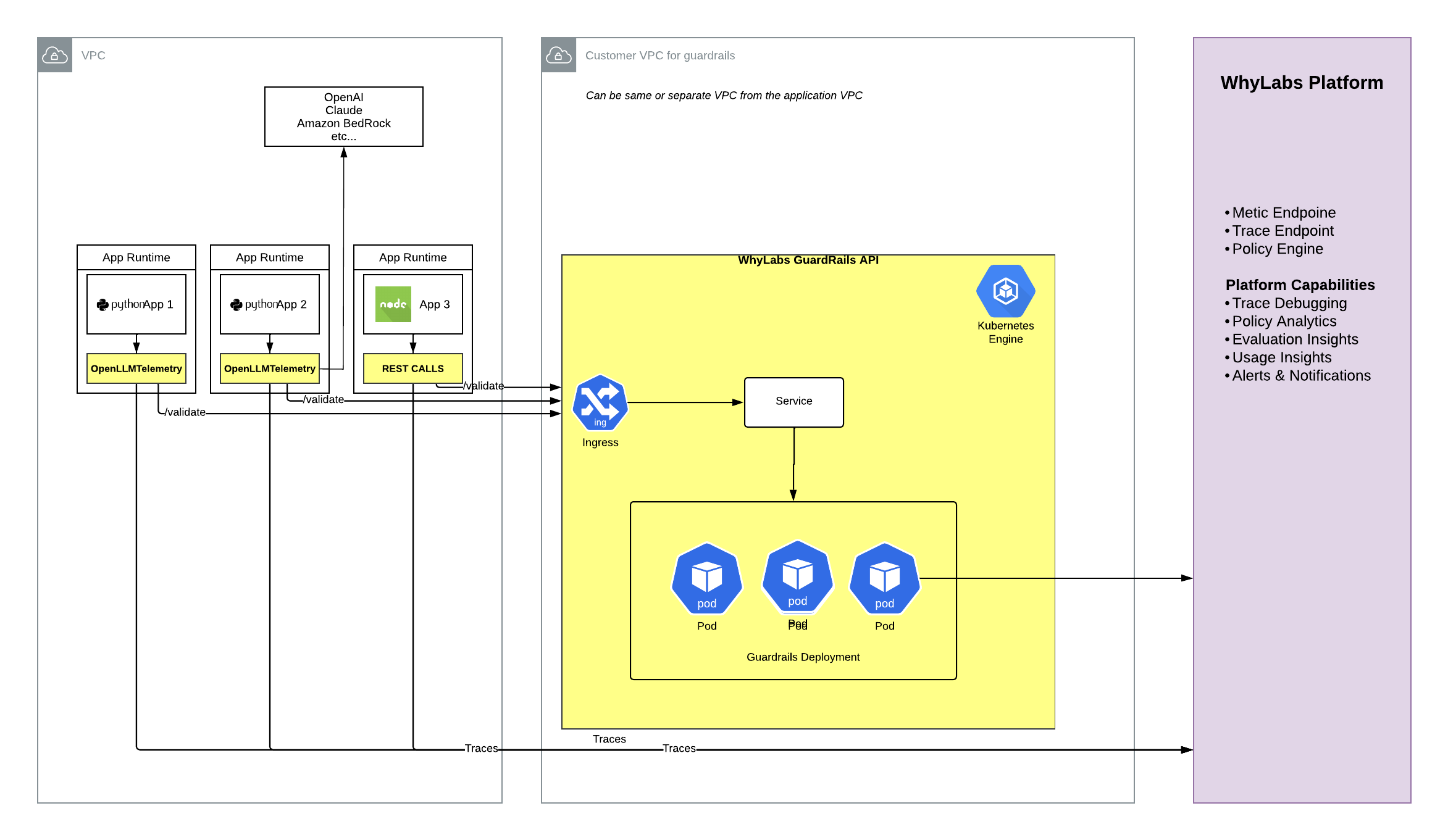
Image Access Token
In order to access the WhyLabs Guardrails API deployment image, you'll need to have the secrets to our container registry. Please reach out to [email protected] for help.
Prerequisites
NOTE: Change the --namespace value if you will be deploying into a namespace other
than guardrails.
Credentials
- Create a WhyLabs API Key
which must be stored in a
whylabs-api-keyKubernetes secret, described below.
kubectl create secret generic whylabs-api-key \
  --namespace=langkit \
  --from-literal=WHYLABS_API_KEY=<whylabs-api-key>
- Generate a random value for the
langkit-api-secretKubernetes secret, also described below. This secret is required to call the container API endpoint.
kubectl create secret generic langkit-api-secret \
  --namespace=langkit \
  --from-literal=CONTAINER_PASSWORD=<langkit-api-secret>
- Create a secret with a WhyLabs provided GitLab token to pull the LangKit image
kubectl create secret docker-registry langkit-gitlab-registry-secret \
  --docker-server="registry.gitlab.com" \
  --docker-username="project_55361491_bot_5a6afbd67224dd1583ccd6c7987354c3" \
  --docker-password="<token>" \
  --docker-email="project_55361491_bot_5a6afbd67224dd1583ccd6c7987354c3@noreply.gitlab.com" \
  --namespace=langkit
Helm Chart Installation
Make sure you get the latest template from our chart repo: https://github.com/whylabs/charts/pkgs/container/langkit
Template
Display the full YAML manifests as they will be applied.
# This will use the "langkit" namespace
helm template --namespace langkit langkit .
Diff
View the difference between the current state and desired state.
# Requires the helm-diff plugin to be installed:
# helm plugin install https://github.com/databus23/helm-diff
helm diff upgrade \
  --allow-unreleased \
  langkit langkit-<latest-tag>.tgz
Install/Update
helm upgrade --install \
  --create-namespace \
  --namespace langkit \
  langkit langkit-<latest-tag>.tgz
Uninstall
helm uninstall \
  --namespace langkit \
  langkit langkit-<latest-tag>.tgz